
Tour the dashboard
The dashboard is the first screen you see in Sanil Booking Kit. It shows what is happening today and what needs your attention.
Today at a glance
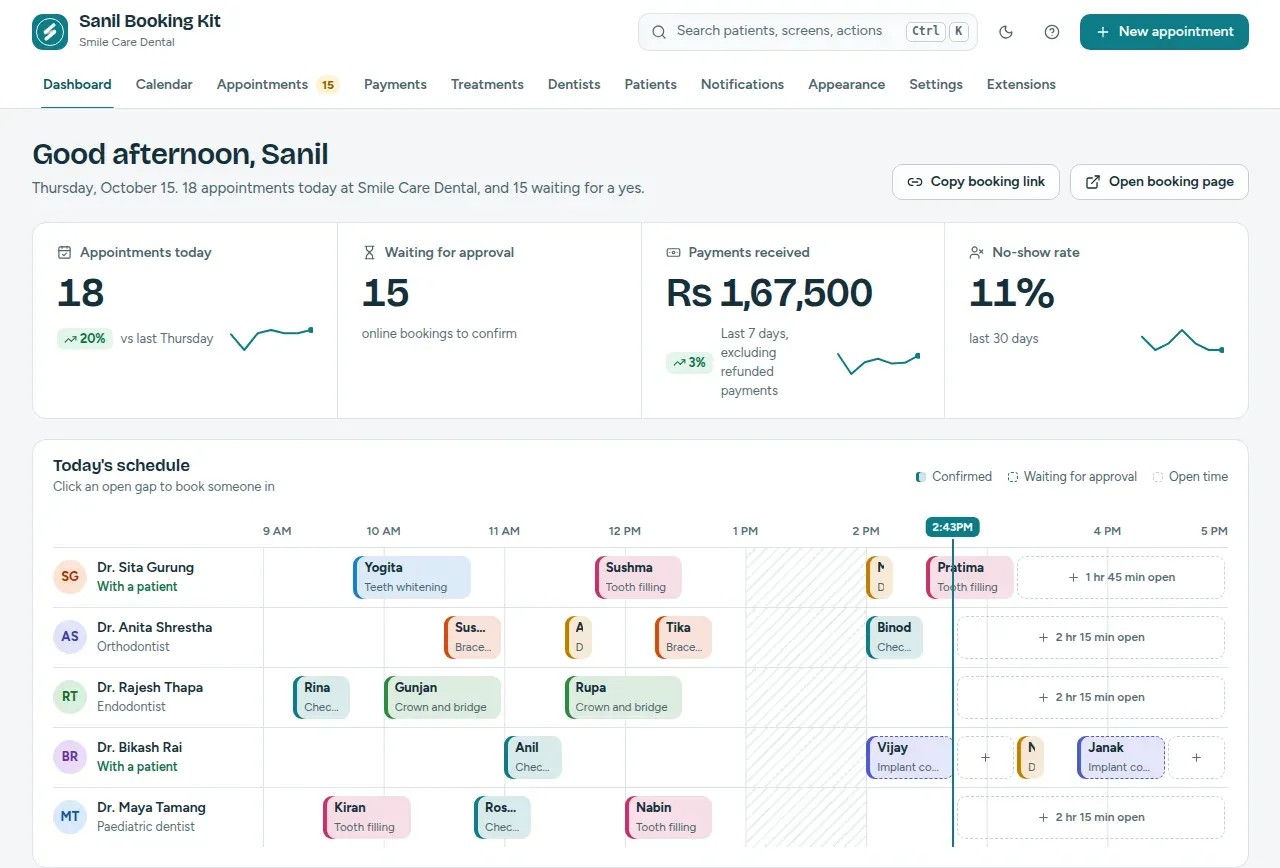
The heading greets you and tells you how many appointments are booked today and how many are waiting for approval. The buttons beside it help you share your booking page:
- Copy booking link copies the address of the page that holds your booking form, ready to paste into a message or your website menu.
- Open booking page opens that page in a new tab.
These two buttons appear once the page that holds your booking form has been opened on your site. If they are missing, publish the page and open it once. See Add the booking form.
Key numbers
- Appointments today compares today with the same day last week. The word follows your business type.
- Waiting for approval counts online bookings that need a yes.
- Payments received adds up the last 7 days, not counting refunded payments.
- No-show rate covers the last 30 days.
Today’s schedule
The schedule has one row for each person. Booked times are blocks, coloured by service. Dashed blocks are Waiting for approval, and dashed outlines marked Open time are free gaps. Striped bands are breaks, and the line shows the current time. Click a free gap to start a new booking at that time.
On a day when you are closed, the schedule says so.
Further down the page
- Waiting for your approval lists new bookings with Confirm and Decline buttons. See all opens the list.
- Bookings is a chart of the last 7, 14 or 30 days, split into completed or confirmed, pending, and cancelled or no-show bookings.
- Next up shows the next appointments across your team.
- Popular lists your most booked services over the last 30 days.
- Busiest times shows when you are busiest, which helps you plan staffing and opening hours.
The dashboard is shown to people who can open the calendar. See Give your team access.